
Piggy Bank Allowance - Bomad
Graeme PParenting
4.446.00 Reviews
- Version
- 2.0.266
- Installs
- 50.00K
- Age Rating
- Everyone
Screenshots


Our Review of Piggy Bank Allowance - Bomad
 Analysis by Appyee
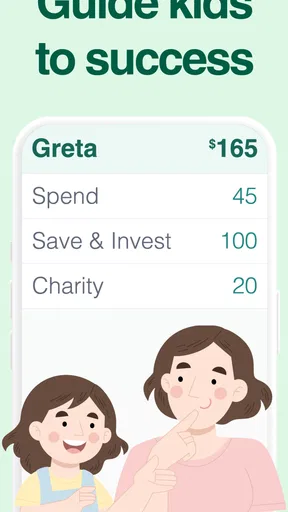
I look for one thing in a children’s money app before anything else: does it make a family’s routine clearer, or does it add another chore for the parent? Piggy Bank Allowance - Bomad is aimed at the first job, turning pocket money into something children can see and discuss rather than a vague promise. Its focus is a virtual balance divided into saving and spending pots, which gives families a simple place to begin talking about choices. I’d consider it most useful when a child is ready to understand that money set aside for one goal cannot also be spent elsewhere.
A quick, low-pressure start
The app is free to download, and its straightforward premise makes it easier to approach than a full household finance tool. I would start with one child, one allowance routine and a small savings goal, then add detail only when the family has settled into checking the balance. That gradual start matters: children learn more from a regular, understandable habit than from a screen full of categories they do not yet need.
The audience is parents who want to make pocket money visible without handing a child access to a conventional bank account. The pots can act as a shared record for conversations about saving and spending. They do not remove the parent’s role; rather, they give both sides something concrete to refer to when deciding whether a purchase fits the child’s plan.
Making a pocket-money routine work
I’d make the allowance routine the main event, with the app serving as a prompt rather than a substitute for a family agreement. Decide together when you’ll review the pots and what should happen if an entry is missed; that keeps small discrepancies from turning into arguments. Once the habit feels manageable, it’s easier to judge whether the app’s simple approach fits your household over time.
Speed expectations and a useful first setup
For a task like recording allowance and keeping savings separate, I would expect a focused app to feel lighter than opening a spreadsheet or building a family budget from scratch. The appeal here is the narrow scope: a child’s pocket money is easier to discuss when the balance and the purpose of that balance are kept in view. I would still keep the first setup modest. Agree on what counts as allowance, when it is added, and whether a child can move money between pots before relying on the app as the family’s sole record.
A practical setup tip is to agree on the meaning of each pot before entering amounts. If “saving” means money reserved for a particular goal in your household, say so; if it means money the child simply chooses not to spend yet, make that clear instead. This small conversation prevents a digital label from creating a disagreement later. The app can make the choice visible, but the family has to define the rule.
Where it fits in an ordinary week
Imagine a child receives pocket money on the weekend and wants a small treat now while also saving for a larger item. A parent can use the app’s pots as a prompt: how much is available to spend, and how much should stay untouched? The child gets a chance to make the trade-off rather than hearing only a yes or no. If plans change, the family can talk through the choice and update its approach together. That is a more useful lesson than treating the app as an automatic answer to every request.
For parents with more than one child, separate records can help keep each child’s allowance and goals distinct. I would avoid comparing balances between siblings as if they were competing scores. Children may have different ages, responsibilities and goals; the point is to help each one understand their own choices. Used that way, a shared routine can reduce confusion about who has saved for what without turning money into a family contest.
Heavy-use moments and family habits
The busiest moments are likely to be the ordinary ones: allowance day, a shop visit, or a child asking whether they can afford something. The app is most useful when it supports a short conversation at those times, not when a parent tries to reconstruct every small cash purchase days later. I would make recording a purchase part of the child’s routine where appropriate, then check it together. That turns the balance into a learning aid and avoids making the parent the sole bookkeeper.
There is a trade-off between accurate records and keeping the habit easy. If every tiny expense requires a long discussion, a child may lose interest; if nothing is recorded, the balance becomes less helpful. A sensible middle ground is to agree which spending needs to be entered and when. For a younger child, a parent may do the update while explaining it. An older child may be ready to take more responsibility for keeping the pots current.
Reliability, expectations and recovery
I would treat any virtual pocket-money record as a planning aid, not proof that physical cash has moved or that money is held in a real account. That distinction is important for children: a number on a screen can represent a family agreement, while the actual money may still be managed by a parent. Being clear about this from the start avoids disappointment at checkout and helps children understand what the app is—and is not—doing.
For reliability, the most useful habit is a simple family check-in. If a balance looks wrong, pause before making a promise based on it and compare the record with what the child actually received or spent. This is also a good chance to correct a missed entry without blame. I would keep important allowance agreements understandable outside the app too, so a forgotten update does not become a bigger argument than the purchase itself.
Device limits and who should choose another approach
The app is listed for Android devices running version 9 or later, so families with an older phone may need another option. It is rated for everyone, which suits a family-oriented tool, but the adult should still guide how a child uses a money tracker. Children who do not have regular access to a device may find a paper chart easier to check together. A notebook can also work better for families that prefer not to make screen time part of allowance day.
Compared with a spreadsheet, a dedicated pocket-money app offers a more child-oriented frame for separating saving from spending, while a spreadsheet gives parents more freedom to design their own categories and calculations. Compared with a basic banking app, this kind of tracker is better suited to family conversations about allowance than to handling real transactions. If your priority is actual payments, a financial product designed for that purpose may be a better fit; if your priority is helping a child practise choices, a visible virtual record may be enough.
What to weigh before you settle into it
The app is free to download, with in-app purchases ranging from $1.99 to $29.99 per item. I would check what an optional purchase adds before making it part of a family routine, and I would not assume that a paid option is necessary to teach the basic habit. The core decision for a parent is whether the way the app organizes pocket money fits the rules you already use. A tool cannot make an allowance system fair or consistent by itself; the household agreement still does that work.
There are also different levels of readiness among children. A child who is just beginning to understand coins may benefit more from handling physical money alongside a parent than from tracking a digital balance alone. A child who already asks to save for specific things may be ready to use separate pots as a planning aid. I would let the child’s interest guide how much responsibility they take on, rather than treating app use as a milestone every child needs to reach at the same age.
First impressions and usability
When I first downloaded Piggy Bank Allowance - Bomad, I was immediately taken by its colorful and friendly interface. The design is playful yet straightforward, making it accessible for both kids and their parents. Setting up accounts for multiple children was a breeze, and the app’s intuitive navigation meant that I didn’t have to spend much time figuring things out.
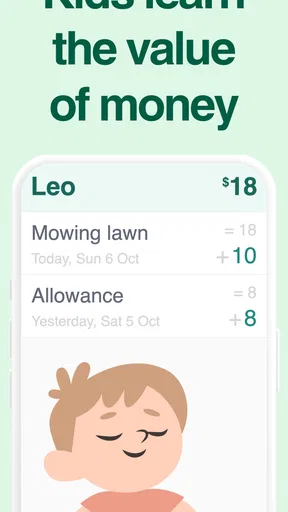
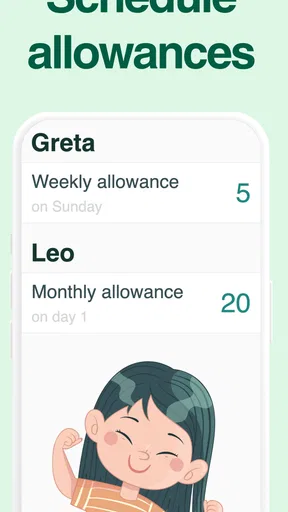
The app offers a virtual piggy bank for each child, where they can track their savings, expenditures, and even set goals. This feature is a fantastic way to help kids visualize their financial habits. The app also allows parents to set up allowances and manage them effortlessly, which is a big win in my book.
Features That Stand Out
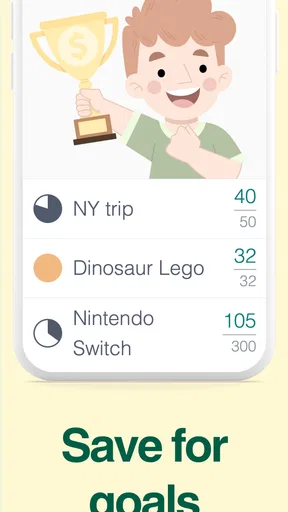
One of the standout features of this app is its goal-setting tool. Kids can create savings goals, whether it's for a new toy, a game, or even something bigger like a bike. This function encourages them to save and teaches them the importance of waiting and working towards something they want.
The app also offers a chore tracker. Parents can assign chores to their kids, and once completed, the app automatically updates their allowance. This feature not only helps in managing household tasks but also instills a sense of responsibility in children.
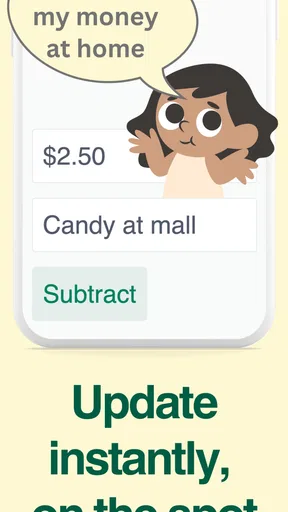
Another nifty feature is the spending tracker. Kids can log their expenditures, and the app provides a breakdown of where their money is going. It’s a practical way to teach budgeting, and I found it helpful in sparking conversations with my kids about spending wisely.
Engagement and Learning
What I love about Piggy Bank Allowance - Bomad is how it makes learning about money a fun experience. The app uses a reward system to keep kids motivated. Each time they achieve a savings goal or complete their chores, they earn badges and points. It's like leveling up in a game, which my kids found incredibly exciting.
The educational content is another highlight. The app includes financial tips and quizzes tailored for children. It’s a great way to teach them about money without feeling like they’re in a classroom. My kids particularly enjoyed the quizzes, and it sparked some interesting discussions at the dinner table.
Room for Improvement
While the app is packed with features, there are a few areas that could be improved. For instance, adding more customization options for avatars would be a fun addition. Kids love personalizing their digital presence, and this could enhance their experience even more.
Additionally, while the app is quite user-friendly, a few more tutorial videos or an FAQ section could help new users get the most out of all the features. Sometimes, diving straight into an app can be overwhelming, so a little guidance goes a long way.
Final Thoughts
Overall, Piggy Bank Allowance - Bomad is a fantastic tool for parents looking to teach their children about financial responsibility. It strikes a perfect balance between education and entertainment. The app is not only helpful for children but also offers parents peace of mind by making money management a collective family effort.
Created by Graeme P, it has an average rating of 4.4 from around 550 ratings and over 10,000 installs. It first appeared on March 24, 2023, and version 2.0.266 is available for Android 9 and later. The age rating is Everyone. Those figures suggest a modest, established audience rather than a brand-new experiment, though popularity alone cannot tell me whether its approach will suit a particular household.
If you're on the lookout for a fun and engaging way to introduce your kids to the world of finance, give Piggy Bank Allowance - Bomad a try. I can confidently say that it has made a positive impact on how my family approaches money matters, and I’m sure it will do the same for yours.
Verdict
Strengths of Piggy Bank Allowance - Bomad
- User-friendly interface for all ages.
- Customizable goals and savings plans.
- Offers educational resources on finance.
- Syncs across multiple devices seamlessly.
- No ads for a distraction-free experience.
Limitations of Piggy Bank Allowance - Bomad
- Limited currency options available.
- No offline mode for remote areas.
- Requires sign-up for full features.
- Some features locked behind paywall.
- Occasional sync issues reported.
Similar Picks in This Category
View All
Family Space
Motorola Mobility LLC.3.9

شرطة الأطفال - مكالمة وهمية
Oub Apps4.1

Findmykids: Parental Control
LETEM LTD4.6

Pregnancy + | Tracker App
Philips Electronics UK Limited4.8

Policía de niños - para padres
Kids police4.7

Pregnancy App
Amila4.9
Frequently Asked Questions
What is Piggy Bank Allowance - Bomad, and how does it work?
Piggy Bank Allowance - Bomad is a financial management app designed for children and parents to manage allowances and savings. The app allows parents to set up virtual piggy banks for their kids, assign chores, and track savings. It integrates educational features to teach children about money management, making it a practical tool for financial literacy.
Is Piggy Bank Allowance - Bomad safe for my child to use?
Yes, Piggy Bank Allowance - Bomad prioritizes safety by incorporating secure login credentials and parental controls. Parents have full access to monitor their child's activities, ensuring a safe environment. The app does not require personal banking information, making it a secure choice for teaching kids about money management.
Can Piggy Bank Allowance - Bomad be used by multiple children in a family?
Absolutely, Piggy Bank Allowance - Bomad is designed to accommodate multiple users. Parents can create separate profiles for each child, allowing individualized tracking of allowances, chores, and savings. This feature makes it ideal for families with more than one child, simplifying financial management for the entire household.
What kind of educational features does Piggy Bank Allowance - Bomad offer?
Piggy Bank Allowance - Bomad offers a range of educational features aimed at teaching children financial literacy. It includes tools for setting savings goals, tracking expenses, and understanding the value of money. The app also provides interactive lessons and quizzes to reinforce important financial concepts in an engaging way.
Is Piggy Bank Allowance - Bomad compatible with both Android and iOS devices?
Yes, Piggy Bank Allowance - Bomad is available for both Android and iOS platforms. Users can download the app from the Google Play Store or the Apple App Store. It is optimized for smooth performance on both operating systems, ensuring a seamless experience regardless of the device used.
